- Grennen
- Room check guide
How to check a hotel room or rental for hidden cameras
A calm routine you can do right after you arrive, with nothing more than the phone in your pocket.
The short version
- Start with anything that faces the bed, the shower or the toilet.
- Turn the lights off and sweep the room slowly with your phone’s flashlight. A camera lens shows up as a tiny, steady point of light.
- Look twice at gadgets that seem out of place: extra chargers, clocks, smoke detectors in odd spots.
- Check the Wi-Fi for devices you don’t recognise.
- If you find something, don’t touch it. Take photos, leave or ask for another room, and report it.
Why it’s worth a few minutes
Most stays are exactly what they seem. But the worry is common: in a June 2025 survey of 1,050 U.S. adults, 58% said they worry about hidden cameras in rentals, and 64% said they wouldn’t know how to find one.
Rules are tightening. Airbnb banned indoor security cameras in its listings in 2024. A rule only helps if you can check, and a quick, methodical look is something anyone can learn.
Before you start
- Your phone. You’ll use its flashlight, and possibly its camera.
- A dark room. Close the curtains and switch off the lights. Reflections are much easier to see in the dark.
- 10 to 20 minutes. Longer for a large rental. Do it before you unpack, so nothing of yours is in the way.
Step 1: Check the usual hiding spots
Hidden cameras need a view, power and somewhere to hide. That narrows things down. Start where privacy matters most, then work outward.
Bedroom
- Clocks, TVs, speakers and chargers facing the bed
- Smoke detectors and air purifiers
- Decor, frames and plants on shelves
Bathroom
- Mirrors and anything opposite the shower or toilet
- Vents and towel hooks
- Shelves, toiletry holders and spare chargers
Living area
- Smoke detectors, vents and light fixtures
- Picture frames, books and plants
- Set-top boxes and anything with a small hole in it
Desk and outlets
- Outlets, power strips and USB chargers
- Under the desk and behind the TV
- Anything plugged in with no clear purpose
As you go, look for things that seem slightly off: a tiny hole or glassy dot on an everyday object, an item angled oddly toward the bed or shower, two smoke detectors in one small room, or a gadget plugged in that doesn’t seem to do anything.
Step 2: The flashlight lens test
Every camera, however small, needs a lens, and lenses bounce light straight back toward its source. That makes them easier to find in the dark than you might expect.
- Close the curtains and turn off the lights.
- Hold your phone’s flashlight right next to your eye, so you’re looking along the beam.
- Sweep each wall slowly, pausing on the spots from step 1.
- Watch for a tiny, sharp point of light that stays bright as you shift your head slightly. Glitter, glass and polished metal tend to sparkle and vanish as you move; a lens tends to stay put.
- If something catches your eye, look closer with the lights on.
Tip: looking through a cardboard tube, like the inside of a paper towel roll, cuts out glare and makes small reflections stand out.
Step 3: Look for small lights in the dark
While the room is dark, look for small status lights: tiny red, green or blue dots on things that shouldn’t have them.
Some cameras use infrared lights to see at night. Those are invisible to your eyes, but some phone cameras can pick them up as a faint purple or white glow. To see whether yours can, point it at a TV remote while you press a button. If the remote’s tip glows on your screen, your phone can see infrared, so sweep the room through the camera as well.
Step 4: Check the Wi-Fi
Many cameras stream video over Wi-Fi. If you’re on the property’s network, look at which devices are connected; some routers show this, and network scanner apps can list devices on the same network. Names that include a camera brand, or that you can’t account for, are worth a closer look.
This check has limits. A camera on a different network, or one that saves to a memory card and never connects, won’t show up. Treat an unfamiliar device as a reason to look harder, not as proof.
What not to rely on
- Detector apps. Phone apps that claim to find cameras vary a lot. Treat a single result as a hint, not an answer.
- RF detectors on their own. They only notice cameras that are transmitting, and phones, routers and other gadgets can set them off.
- One quick glance. Cameras hide in ordinary objects. A slow, methodical pass beats a fast one.
A camera that never transmits makes no signal to detect. That’s why the lens check in step 2 is the one to do every time.
If you find a camera
- Leave it where it is. Don’t unplug or remove it; it may be evidence. If you need privacy right away, cover it with a towel.
- Document it. Take photos and a short video showing the device and where it’s pointing.
- You don’t have to stay. Leave, or ask for another room.
- Report it. Tell the front desk or host, report it to the booking platform, and contact the local police.
Where Grennen R1 fits
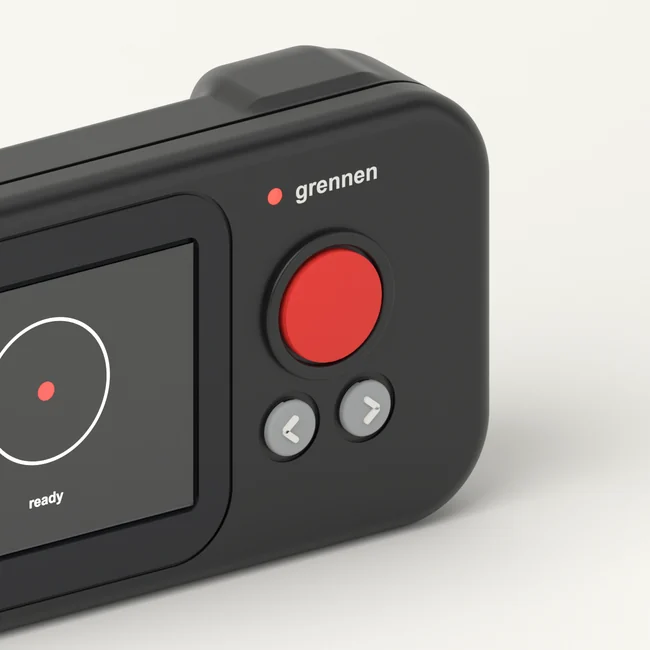
We’re building Grennen R1 to make step 2 quicker and clearer: a handheld you point at the room, and hidden lenses glow on its screen. It’s in development, and we test before we sell.
Questions
Are hosts allowed to have cameras inside a rental?
It depends on where you are and how you booked. Airbnb banned indoor security cameras in its listings in 2024, and recording people in private spaces such as bedrooms and bathrooms is illegal in many places. If you’re unsure, ask the host or the booking platform before you book.
Can my phone find hidden cameras?
Your phone’s flashlight is the most useful tool you have: it helps you spot the small, steady reflection a camera lens gives back. Some phone cameras can also show the infrared light that night-vision cameras use. Hidden camera detector apps vary a lot, so treat their results as a hint, not an answer.
How long does a check take?
Plan on 10 to 20 minutes for a careful look at a hotel room, and longer for a larger rental. Start with the bed, the shower and the toilet, then work outward.
What should I do if I find a hidden camera?
Don’t unplug or remove it, because it may be evidence. Take photos and a short video showing where it is. You don’t have to stay: leave, or ask for another room. Then tell the front desk or host, report it to the booking platform, and contact the local police.
Will a radio-frequency (RF) detector find every camera?
No. An RF detector only notices cameras that are transmitting, and phones, routers and other gadgets can set it off. A camera that records to a memory card and never transmits makes no signal to detect, which is why the flashlight lens check matters.